Talking Search Bar: Light Up Your Store!
The search box is one of the most common but most easily overlooked elements in e-commerce. Want to make your store’s search more interesting and attractive? Let’s try a “talking” search bar!
✨ Effect Preview

As shown above, the prompts in the search bar can change dynamically, for example:
- “Search for shoes”
- “Find your next favorite outfit”
- “Looking for gifts?”
Isn’t it more appealing than the static “Search...” prompt?
🛠️ How to Achieve This
Step 1: Create a New File
Create a dynamic-search.liquid file in the sections directory.
Step 2: Insert the Code Below
{{ 'component-search.css' | asset_url | stylesheet_tag }}
{{ 'component-card.css' | asset_url | stylesheet_tag }}
{{ 'component-price.css' | asset_url | stylesheet_tag }}
<style>
.dynamic-search-section {
padding: {{ section.settings.section_padding_top }}px 20px {{ section.settings.section_padding_bottom }}px;
max-width: {{ section.settings.max_width }}px;
margin: 0 auto;
}
.dynamic-search-wrapper {
position: relative;
width: 100%;
}
.dynamic-search-form {
position: relative;
width: 100%;
}
.dynamic-search-input {
width: 100%;
height: {{ section.settings.input_height }}px;
padding: 0 60px 0 20px;
font-size: 18px;
border: 2px solid #e0e0e0;
border-radius: {{ section.settings.input_border_radius }}px;
outline: none;
transition: all 0.3s ease;
font-family: inherit;
}
.dynamic-search-input:focus {
border-color: #333;
box-shadow: 0 4px 12px rgba(0, 0, 0, 0.1);
}
.dynamic-search-placeholder {
position: absolute;
left: 20px;
top: 50%;
transform: translateY(-50%);
font-size: 18px;
color: #999;
pointer-events: none;
display: flex;
align-items: center;
}
.dynamic-search-placeholder.hidden {
display: none;
}
.placeholder-static {
color: #666;
}
.placeholder-dynamic {
color: #999;
border-right: 2px solid #999;
padding-right: 2px;
animation: blink 0.7s infinite;
}
@keyframes blink {
0%, 49% {
border-color: #999;
}
50%, 100% {
border-color: transparent;
}
}
.search-submit-btn {
position: absolute;
right: 8px;
top: 50%;
transform: translateY(-50%);
background: {{ section.settings.button_color }};
border: none;
width: calc({{ section.settings.input_height }}px - 12px);
height: calc({{ section.settings.input_height }}px - 12px);
border-radius: {{ section.settings.input_border_radius }}px;
cursor: pointer;
display: flex;
align-items: center;
justify-content: center;
transition: all 0.3s ease;
}
.search-submit-btn:hover {
background: {{ section.settings.button_hover_color }};
transform: translateY(-50%) scale(1.05);
}
.search-submit-btn svg {
width: 20px;
height: 20px;
fill: white;
}
/* Search Results */
.search-results-container {
margin-top: 20px;
display: none;
}
.search-results-container.active {
display: block;
}
.products-grid {
display: grid;
grid-template-columns: repeat(2, 1fr);
gap: 16px;
}
.search-product-card {
background: white;
border: 1px solid #e5e5e5;
border-radius: {{ section.settings.input_border_radius }}px;
overflow: hidden;
transition: all 0.3s ease;
text-decoration: none;
color: inherit;
display: flex;
align-items: center;
}
.search-product-card:hover {
box-shadow: 0 2px 8px rgba(0, 0, 0, 0.08);
border-color: #d0d0d0;
}
.search-product-image {
width: 100px;
height: 100px;
flex-shrink: 0;
object-fit: cover;
background: #f9f9f9;
}
.search-product-info {
padding: 12px 14px;
flex: 1;
min-width: 0;
}
.search-product-title {
font-size: 14px;
font-weight: 500;
margin: 0 0 6px 0;
color: #333;
line-height: 1.4;
display: -webkit-box;
-webkit-line-clamp: 2;
-webkit-box-orient: vertical;
overflow: hidden;
}
.search-product-price {
font-size: 16px;
font-weight: 600;
color: #333;
display: flex;
align-items: center;
gap: 8px;
line-height: 1.2;
}
.search-product-price .compare-price {
font-size: 14px;
font-weight: 400;
color: #999;
text-decoration: line-through;
}
@media screen and (max-width: 768px) {
.dynamic-search-section {
padding: 40px 15px;
}
.dynamic-search-input {
font-size: 16px;
height: {{ section.settings.input_height | minus: 10 }}px;
padding: 0 {{ section.settings.input_height | minus: 10 | plus: 5 }}px 0 18px;
}
.dynamic-search-placeholder {
font-size: 16px;
left: 18px;
}
.search-submit-btn {
width: calc({{ section.settings.input_height }}px - 22px);
height: calc({{ section.settings.input_height }}px - 22px);
}
.products-grid {
grid-template-columns: 1fr;
gap: 12px;
}
.search-product-image {
width: 80px;
height: 80px;
}
.search-product-info {
padding: 10px 12px;
}
.search-product-title {
font-size: 13px;
margin-bottom: 4px;
}
.search-product-price {
font-size: 15px;
}
}
@media screen and (min-width: 769px) and (max-width: 1024px) {
.products-grid {
grid-template-columns: repeat({{ section.settings.results_per_row_tablet }}, 1fr);
}
}
@media screen and (min-width: 1025px) {
.products-grid {
grid-template-columns: repeat({{ section.settings.results_per_row_desktop }}, 1fr);
}
}
</style>
<div class="dynamic-search-section">
<div class="dynamic-search-wrapper">
<form action="{{ routes.search_url }}" method="get" class="dynamic-search-form">
<input
type="search"
name="q"
class="dynamic-search-input"
id="dynamic-search-input"
autocomplete="off"
value="{{ search.terms | escape }}"
>
<div class="dynamic-search-placeholder" id="dynamic-placeholder">
<span class="placeholder-static">{{ section.settings.search_prefix }} </span>
<span class="placeholder-dynamic" id="typing-text"></span>
</div>
<button type="submit" class="search-submit-btn" aria-label="Search">
<svg xmlns="http://www.w3.org/2000/svg" viewBox="0 0 24 24">
<path d="M15.5 14h-.79l-.28-.27C15.41 12.59 16 11.11 16 9.5 16 5.91 13.09 3 9.5 3S3 5.91 3 9.5 5.91 16 9.5 16c1.61 0 3.09-.59 4.23-1.57l.27.28v.79l5 4.99L20.49 19l-4.99-5zm-6 0C7.01 14 5 11.99 5 9.5S7.01 5 9.5 5 14 7.01 14 9.5 11.99 14 9.5 14z"/>
</svg>
</button>
</form>
<!-- Search Results Container -->
<div class="search-results-container" id="search-results">
<div class="products-grid" id="products-grid"></div>
</div>
</div>
</div>
<script>
(function() {
const wordsString = '{{ section.settings.typing_words }}';
const words = wordsString.split(',').map(word => word.trim()).filter(word => word.length > 0);
let wordIndex = 0;
let charIndex = 0;
let isDeleting = false;
let typingSpeed = 150;
const typingText = document.getElementById('typing-text');
const searchInput = document.getElementById('dynamic-search-input');
const placeholder = document.getElementById('dynamic-placeholder');
// Toggle placeholder visibility
function togglePlaceholder() {
if (searchInput.value.length > 0) {
placeholder.classList.add('hidden');
} else {
placeholder.classList.remove('hidden');
}
}
// Typing effect
function typeEffect() {
const currentWord = words[wordIndex];
if (isDeleting) {
// Delete characters
typingSpeed = 100;
charIndex--;
typingText.textContent = currentWord.substring(0, charIndex);
if (charIndex === 0) {
isDeleting = false;
wordIndex = (wordIndex + 1) % words.length;
typingSpeed = 500; // Pause before starting new word
}
} else {
// Add characters
typingSpeed = 150;
charIndex++;
typingText.textContent = currentWord.substring(0, charIndex);
if (charIndex === currentWord.length) {
isDeleting = true;
typingSpeed = 2000; // Pause after displaying complete word
}
}
setTimeout(typeEffect, typingSpeed);
}
// Listen for input changes
searchInput.addEventListener('input', togglePlaceholder);
searchInput.addEventListener('focus', togglePlaceholder);
searchInput.addEventListener('blur', togglePlaceholder);
// Focus input when clicking placeholder
placeholder.addEventListener('click', function() {
searchInput.focus();
});
// Initialize
togglePlaceholder();
setTimeout(typeEffect, 1000);
// ===== Real-time Search Functionality =====
let searchTimeout;
const resultsContainer = document.getElementById('search-results');
const productsGrid = document.getElementById('products-grid');
// Search products
function searchProducts(query) {
if (!query || query.trim().length < 2) {
resultsContainer.classList.remove('active');
return;
}
// Call Shopify Search API
fetch(`/search/suggest.json?q=${encodeURIComponent(query)}&resources[type]=product&resources[limit]=12`)
.then(response => response.json())
.then(data => {
const products = data.resources.results.products || [];
if (products.length === 0) {
resultsContainer.classList.remove('active');
return;
}
// Show results container
resultsContainer.classList.add('active');
productsGrid.innerHTML = '';
// Render products
const currencySymbol = '{{ section.settings.currency_symbol | default: "$" }}';
productsGrid.innerHTML = products.map(product => {
const price = product.price || '0.00';
const comparePrice = product.compare_at_price_max || null;
const imageUrl = product.image || product.featured_image;
return `
<a href="${product.url}" class="search-product-card">
${imageUrl ? `
<img
src="${imageUrl}"
alt="${product.title.replace(/"/g, '"')}"
class="search-product-image"
loading="lazy"
>
` : `
<div class="search-product-image" style="display: flex; align-items: center; justify-content: center; background: #f5f5f5;">
<span style="color: #999;">No image</span>
</div>
`}
<div class="search-product-info">
<h3 class="search-product-title">${product.title}</h3>
<div class="search-product-price">
${currencySymbol}${price}
${comparePrice && parseFloat(comparePrice) > parseFloat(price) ? `
<span class="compare-price">${currencySymbol}${comparePrice}</span>
` : ''}
</div>
</div>
</a>
`;
}).join('');
})
.catch(error => {
resultsContainer.classList.remove('active');
});
}
// Listen for input, search after 1 second delay
searchInput.addEventListener('input', function(e) {
clearTimeout(searchTimeout);
const query = e.target.value;
if (query.trim().length < 2) {
resultsContainer.classList.remove('active');
return;
}
searchTimeout = setTimeout(() => {
searchProducts(query);
}, 1000);
});
// Prevent default form submission for custom search
document.querySelector('.dynamic-search-form').addEventListener('submit', function(e) {
const query = searchInput.value.trim();
if (query.length < 2) {
e.preventDefault();
return;
}
// Allow normal submission to search page
});
})();
</script>
{% schema %}
{
"name": "Dynamic Search",
"settings": [
{
"type": "paragraph",
"content": "A search section with dynamic typing placeholder effect"
},
{
"type": "header",
"content": "Search Text Settings"
},
{
"type": "text",
"id": "search_prefix",
"label": "Search Prefix Text",
"default": "Search for",
"info": "Fixed text displayed before the dynamic typing text"
},
{
"type": "textarea",
"id": "typing_words",
"label": "Typing Loop Content",
"default": "Jordan, Dunk SB, New Balance, Air Force 1, Yeezy",
"info": "Separate multiple words with commas. Example: Jordan, Dunk SB, New Balance"
},
{
"type": "header",
"content": "Layout Settings"
},
{
"type": "range",
"id": "section_padding_top",
"min": 0,
"max": 120,
"step": 4,
"unit": "px",
"label": "Section Padding Top",
"default": 60
},
{
"type": "range",
"id": "section_padding_bottom",
"min": 0,
"max": 120,
"step": 4,
"unit": "px",
"label": "Section Padding Bottom",
"default": 60
},
{
"type": "range",
"id": "input_height",
"min": 40,
"max": 80,
"step": 2,
"unit": "px",
"label": "Search Input Height",
"default": 56
},
{
"type": "range",
"id": "input_border_radius",
"min": 0,
"max": 20,
"step": 1,
"unit": "px",
"label": "Border Radius",
"default": 12,
"info": "Controls border radius for both search box and button"
},
{
"type": "range",
"id": "max_width",
"min": 400,
"max": 1200,
"step": 50,
"unit": "px",
"label": "Search Box Max Width",
"default": 800
},
{
"type": "header",
"content": "Search Results Settings"
},
{
"type": "range",
"id": "results_per_row_desktop",
"min": 1,
"max": 4,
"step": 1,
"label": "Products Per Row (Desktop)",
"default": 3
},
{
"type": "range",
"id": "results_per_row_tablet",
"min": 1,
"max": 3,
"step": 1,
"label": "Products Per Row (Tablet)",
"default": 2
},
{
"type": "header",
"content": "Button Settings"
},
{
"type": "color",
"id": "button_color",
"label": "Search Button Color",
"default": "#333333"
},
{
"type": "color",
"id": "button_hover_color",
"label": "Search Button Hover Color",
"default": "#000000"
}
],
"presets": [
{
"name": "Dynamic Search"
}
]
}
{% endschema %}
🚀 Advanced Usage Tips
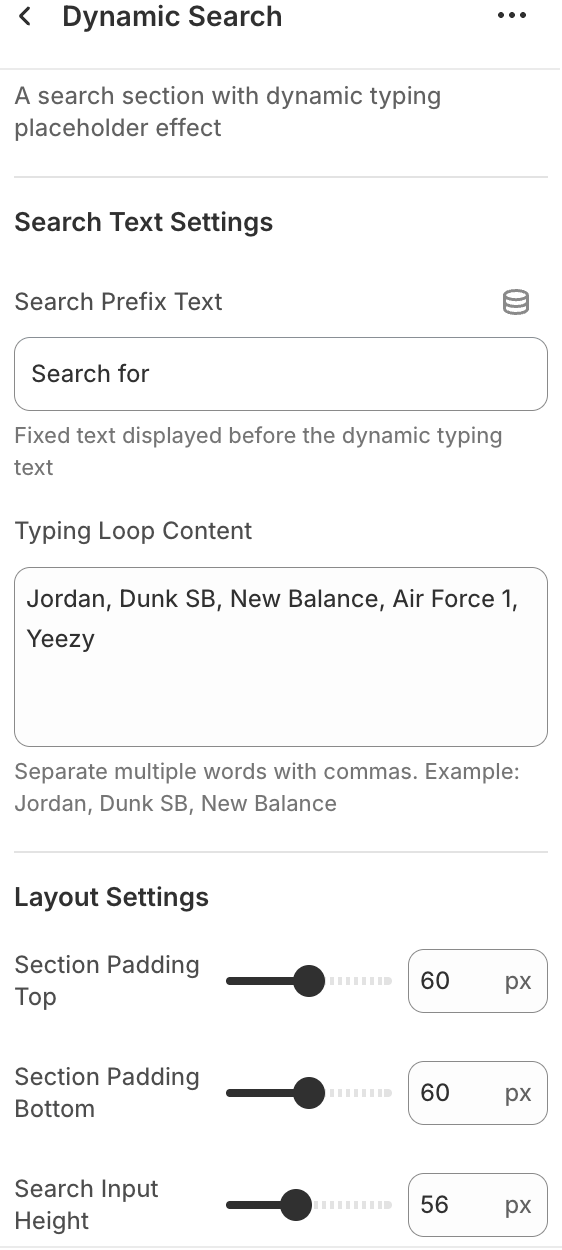
- Set your own custom product keyword suggestions, making the search bar more relevant to your store
- Customize border size, radius, and height to easily fit your theme
- You can also customize the search button color to enhance your brand style
💡 Tips
- Try different prompts to see which increases user clicks and conversions!
- It is recommended to customize the style to match your theme colors and brand atmosphere for a consistent effect.